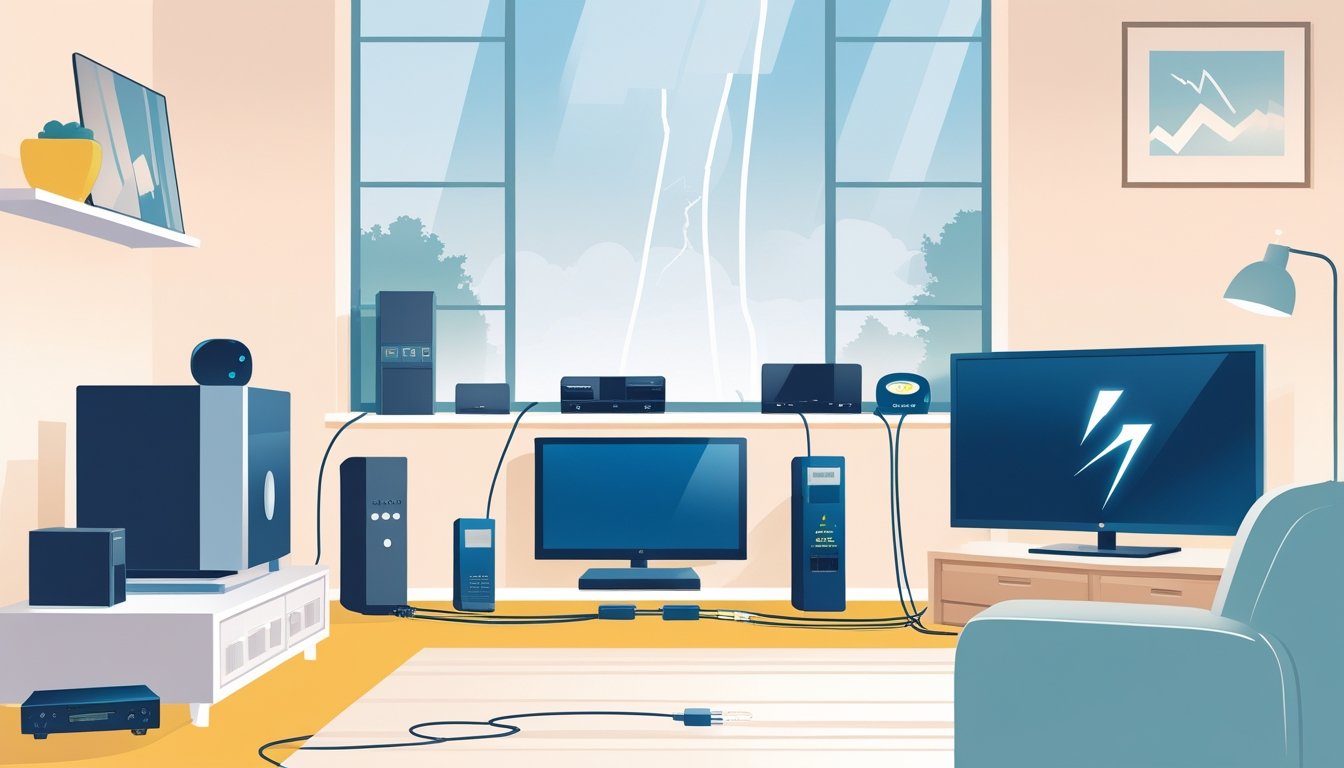
Power surges can wreck your electronics and lead to expensive repairs or replacements. Honestly, the best way to protect your devices is by using quality surge protectors and having solid electrical safeguards. It’s a simple step that keeps your home safer and helps dodge those surprise bills.
You’re not on your own when it comes to power surges. AAA Electrical Services has licensed pros who get just how important your family’s safety is. With same-day service and vans stocked with gear, they can jump in fast to help protect homes around Sacramento.
Want to save money (and headaches)? Let’s dig into some straightforward tips to keep your electronics safe from power surges.
Understanding Power Surges
Power surges happen when voltage in your home’s electrical system suddenly shoots up. These spikes come from a bunch of sources and can mess with your electronics in all sorts of ways. If you know what causes surges and the kinds you might face, you’ll be way ahead when it comes to protecting your stuff.
What Causes Power Surges
Power surges can hit from both outside and inside your home. Lightning strikes in your area can send a huge jolt through the power lines, overloading your system.
Inside, surges often pop up when big appliances like AC units or fridges cycle on and off, spiking the voltage. Bad wiring or the sudden return of power after an outage can also trigger surges.
Types of Power Surges
You’ll mostly run into three types of power surges:
- External surges: Stuff like lightning or power grid hiccups.
- Internal surges: When heavy appliances switch on or off, or if there’s a short circuit.
- Persistent overvoltages: Ongoing higher voltage from things like bad wiring or problems with the utility company.
Short bursts cause most of the damage, but those slow, steady overvoltages can wear your devices down, too. A whole-house surge protector can block a lot of these, offering some peace of mind for homes in Sacramento and nearby areas.
Effects of Power Surges on Electronics
Power surges can take out electronics in different ways. Small spikes chip away at the lifespan of your gear, stressing out their parts. Big surges? They can fry circuits or blow sensitive chips in a flash.
TVs, computers, HVAC systems, and kitchen appliances are all fair game. Replacing them isn’t cheap—or fun. Folks in Roseville and Elk Grove often call AAA Electrical Services for help with surge protection and repairs.
Identifying Vulnerable Electronics
It helps to know which electronics in your house are most at risk. Spotting the devices that are likely to fail—and catching early signs of damage—can save you a lot of trouble.
High-Risk Devices
Some electronics are just more vulnerable. Here’s a quick list:
- TVs and home theater systems
- Computers and laptops
- Refrigerators and freezers
- HVAC units
- Gaming consoles
- Smart home gadgets like thermostats and cameras
These are packed with delicate electronics that don’t handle voltage spikes well. Surge protectors or whole-home surge protection make a lot of sense here. AAA Electrical Services suggests whole-house protection if you’ve got a lot of these. It keeps surges from sneaking into your wiring and frying your equipment.
Signs of Power Surge Damage
How do you know if a surge already did some damage? Watch for:
- Devices that won’t turn on or keep resetting
- Flickering or dimming lights
- Electronics acting weird or freezing up
- A burning smell near outlets or devices
- Circuit breakers that trip a lot
If you spot any of this, it’s time to call in a pro. Early action can keep things from getting worse—or unsafe. AAA Electrical Services does electrical inspections around Sacramento and nearby towns, so you can catch problems before they snowball.
Choosing the Right Surge Protection
Picking a surge protector isn’t just about grabbing the first thing on the shelf. You want to know what features matter, where to put it, and how to tell a real surge protector from a basic power strip.
Features to Look for in Surge Protectors
Go for surge protectors with a high joule rating—over 1,000 joules is a solid bet. That number tells you how much energy it can soak up before it quits.
Check out the clamping voltage too. Lower is better (400 volts or less), because it means the protector kicks in sooner.
Extras like LED indicators are handy so you know it’s still working, and some come with warranties for connected devices. Multiple outlets and USB ports are nice, but not a must.
Whole-home surge protectors, installed by a pro, offer the best protection. AAA Electrical Services can set you up fast with same-day service.
Differences Between Power Strips and Surge Protectors
Power strips just give you more outlets—they don’t stop surges. Surge protectors have special parts that soak up voltage spikes from lightning or wiring problems.
Always check for a UL listing and make sure the protector matches your electronics. Don’t rely on a power strip if you’re serious about stopping surges.
Recommended Surge Protector Placement
Put surge protectors right by the devices you want to guard—TVs, computers, game consoles. This cuts down on the chance of spikes zipping through long cords.
For bigger coverage, a whole-home surge protector at your main electrical panel blocks surges before they hit your wiring.
Don’t daisy-chain surge protectors or plug them into extension cords. That just makes things less safe and can even be a fire risk.
If you want it done right, let AAA Electrical Services handle the installation. Their team covers Sacramento and nearby spots, always putting your family’s safety first.
Installation and Usage Tips
Just having surge protectors isn’t enough—you’ve got to use them right. A little know-how goes a long way to keep your electronics safe from power spikes.
Proper Installation of Surge Protectors
Install surge protectors in dry, easy-to-reach spots near your main electronics. Skip plugging them into extension cords or power strips, since that can cut down their effectiveness.
Pick a surge protector rated for the voltage and wattage of your gear. Look for safety certifications to make sure it meets industry standards.
For whole-home protection, have a professional put a surge protector on your electrical panel. AAA Electrical Services handles this in Sacramento, giving your house a solid first line of defense.
Check surge protectors now and then for wear or damage. Swap them out every few years or after a big surge.
Safe Device Connection Practices
Plug important stuff—TVs, computers, HVAC—directly into surge protectors. This helps block sudden voltage jumps.
Don’t overload surge protectors with too many high-power devices. Always check the max load rating before plugging in a bunch of appliances.
If a storm is rolling in or the power’s out, unplug non-essential devices. Got a generator? Make sure it’s installed safely so you don’t risk a surge when power returns.
Keep cords dry and away from water. If a cord’s damaged, fix or replace it before using.
These habits help protect your electronics and keep your family safer.
Whole-House Surge Protection Options
Want to shield your whole home from surges? That means installing devices that stop high voltage before it can fry your wiring and electronics. You’ll usually find these surge protectors at your main electrical panel. Picking the right system and getting it installed properly matters if you want real protection.
Main Panel Surge Protectors
A main panel surge protector goes right where your electrical service enters your house. It’s your first line of defense, blocking nasty surges before they can travel through your wiring. That way, big-ticket items like appliances and HVAC gear are less likely to get zapped by lightning, grid issues, or big motors switching on.
These protectors hook straight to your breaker panel and can handle way bigger surges than the plug-in kind. If you want whole-house protection, this is the way to go. Your entire electrical system benefits, and you’ll probably save on repair hassles.
Professional Installation Guide
Whole-house surge protector installation isn’t a DIY thing. You need a licensed electrician—like the folks at AAA Electrical Services—to wire it up safely. With the right tools, it usually takes less than an hour.
Getting it in the right spot at your main panel is key. The electrician will test your setup and make sure it works with your home’s wiring. This way, you get protection that actually works, and you don’t have to worry.
If you’re in Sacramento, Roseville, or Elk Grove, you can get same-day service. Their electricians show up ready, so most jobs get done without any delays. It’s quick, safe, and keeps your family’s safety front and center.
Complementary Protection Methods
You can boost your electronics’ safety even more with gear that manages power quality and gives backup during outages. These extra layers help cut down damage from sudden surges or shaky voltage.
Uninterruptible Power Supplies (UPS)
A UPS is a battery backup that keeps your electronics running if the power cuts out. It gives you time to save work or shut things down safely.
Lots of UPS models come with built-in surge protection, guarding against spikes from lightning or grid trouble. If you rely on computers, security systems, or medical gear, a UPS is a no-brainer.
Pick a UPS with enough battery capacity for your needs and check it every so often. If you want it set up right, AAA Electrical Services in Sacramento and nearby can help.
Voltage Regulators
Voltage regulators keep your devices humming by holding the voltage steady. They protect against both drops and spikes—stuff that’s common during storms or when the power company’s having a rough day.
Using a voltage regulator can make TVs, computers, and appliances last longer. It smooths out the power before it ever gets to your gear.
If you’re in Roseville, Rocklin, or Elk Grove and notice power swings, a voltage regulator is a smart call. AAA Electrical Services can help you pick and install the right one for your place.
Routine Maintenance and Monitoring
Keeping electronics safe isn’t a one-and-done deal. Staying on top of maintenance and watching your electrical system helps you catch issues early and keeps your surge protection working when it counts.
Testing and Replacing Surge Protectors
Surge protectors don’t last forever. Test them every year to make sure they’re still doing their job. Most have an indicator light—if it’s out or blinking weirdly, it’s time for a new one.
They usually last 3 to 5 years, but a big surge can cut that short. Don’t wait too long to replace old ones, especially if storms or power swings are common where you live. Using a worn-out surge protector is just asking for trouble.
If you’re not sure how to test or replace yours, call AAA Electrical Services. They can check your setup and help you pick the right surge protector for your needs.
Monitoring Voltage Fluctuations
Voltage swings can slowly wreck sensitive electronics. You can keep tabs by installing a whole-house surge protector or a voltage monitor. These devices give you a heads-up if the power’s acting up.
Check your panel for flickering lights or breakers that trip often—could be a sign of voltage problems. AAA Electrical Services does electrical inspections in Sacramento and nearby, so you can catch issues before they get serious.
Keeping an eye on your home’s electrical health saves money and gives you a little more peace of mind. Simple checks and regular tune-ups can keep your family safer and your electronics running longer.
Emergency Steps After a Power Surge
If you get hit by a power surge, act fast. Check your electronics right away and handle anything that’s acting up. That way, you can avoid bigger headaches or safety risks down the line.
Inspecting Electronics for Damage
First things first—unplug everything that was connected during the surge. Take a close look for visible signs of damage: melted plugs, scorch marks, maybe even strange smells. If you spot any of these, that device’s probably not safe to use.
Try plugging each device into a different outlet that’s on another circuit, if you can. If it won’t power up or acts weird, the surge might've fried something inside. Don’t try to fix it yourself, tempting as that might be.
If you see damage, just stop and call a pro. AAA Electrical Services has same-day support with licensed techs—honestly, it’s just safer and easier to let them handle it.
What to Do If Devices Malfunction
If a device starts acting up after a surge, don’t keep using it. That could make things worse or even start a fire. Power it off and unplug it right away.
For big-ticket items—like your fridge or AC—you’ll want a technician to check them out before flipping them back on. Local pros usually have the parts and can get you back up and running pretty fast.
Jot down a list of everything that’s acting up. That way, you’ve got info ready for your electrician or insurance company if it comes to that. Acting quickly can really save you some headaches (and money) down the road.
Reducing Risk With Preventive Measures
If you want to keep your electronics safe from surges, you’ve got to manage how power moves through your home. That means don’t overload your circuits, and keep your cables and outlets in good shape—no shortcuts here.
Avoiding Overloaded Circuits
An overloaded circuit happens when you cram too many things into one outlet or circuit. That’s a recipe for surges or a tripped breaker—not great for your gadgets.
Spread your devices out across different outlets. Skip daisy-chaining power strips together. If your breaker’s tripping a lot or outlets feel warm, get a licensed electrician on the phone.
AAA Electrical Services does panel upgrades, which is a solid move if you’ve got a lot of stuff running in your Sacramento or Roseville home. Balanced circuits just make life easier and safer.
Managing Cables and Outlets
Frayed cords or loose outlets? That’s asking for trouble. Always check cables for cracks, frays, or bent prongs. Swap out anything that looks dodgy.
Outlets should feel snug—not wobbly—when you plug something in. Loose connections can spark or cut power, which is rough on electronics.
Surge protectors help, but only if you use them with solid outlets and good wiring. If you’re not sure, book an electrical inspection with AAA Electrical Services. Their licensed techs can usually spot problems before they get serious in Sacramento and nearby spots.
Frequently Asked Questions
Keeping electronics safe really comes down to picking the right surge protector, knowing how to use it, and checking it once in a while. Not sure about the difference between a power strip and a surge protector? Or when to replace them? Here are some real-world answers to common questions.
What are the best surge protectors for home electronics?
Go for surge protectors with a high joule rating—they’ll soak up more energy from a spike before giving out. Models with a light or indicator are handy so you know they’re still working.
Whole-house surge protection is a strong bet, too. Pair it with individual protectors for solid coverage.
Can you recommend any DIY methods for safeguarding devices against electrical spikes?
Plug all your important electronics—TVs, computers, game consoles—into surge protectors. If you want to play it extra safe, unplug stuff during storms.
Don’t overload your circuits, and check your home wiring for wear now and then. If you’re unsure, just call an electrician.
How often should surge protectors be replaced for optimal protection?
Surge protectors don’t last forever. Swap them out every 3 to 5 years, or sooner if you’ve had a big surge. Some have a light or reset button to let you know when it’s time.
Are power strips and surge protectors the same, and if not, how do they differ?
Nope—power strips just give you more outlets. Surge protectors actually guard against voltage spikes.
If you want real protection, pick a surge protector over a regular strip.
What should I look for when purchasing a surge protector for sensitive electronics?
Check for a high joule rating (more is better), fast spike response, and protection for data lines if you’re plugging in phones or internet devices.
Look for UL certification or another safety mark—that means it actually meets safety standards.
Is it necessary to have surge protection for all household devices, and why?
You don’t really need surge protection for every single device. The most important ones? Computers, TVs, HVAC units—basically, anything expensive or sensitive to voltage swings.
Whole-house surge protection can shield your wiring and appliances from those big, unpredictable voltage spikes. It’s not just about saving money, either; it’s about not having to worry every time there’s a storm or a hiccup in the grid.
If you’re thinking about getting it set up, AAA Electrical Services handles surge protection in Sacramento and nearby areas. They focus on safety, families, and offer same-day help with straightforward pricing.